Posts

Designing a Report from Multiple Tables - Business Central complete tutorial

Image
Multi-purpose Buttons Join on WhatsApp E-books for International Buyers E-books for Indian Buyers Schedule a Call Introduction The report dataset and the visual design are the two basic components of a report object. The dataset definition is done first when making a report, then the visual design. Report data is defined in AL code. You can use Word or Excel for a Report Definition Language (RDL) layout and Visual Studio Report Designer or Microsoft SQL Server Reporting Services Report Builder for a Word or Excel layout. The Business Central Web client can then be used to share a report you've created with other programmes. You may utilise a single table or aggregate data from numerous tables to build a report. This tutorial will demonstrate how to create a report using information from various tables. You will learn Instances of more than one table need a dataset definition. Extending a data record by inclu...

Report in Business Central: Word Layout

Image
Multi-purpose Buttons Join on WhatsApp E-books for International Buyers E-books for Indian Buyers Schedule a Call  Introduction In this blog, I will show you how to create reports in word layout.  The purpose of a report is to either print or show data from a database. Print documents like invoices with the help of reports that organize and summarise data. For instance, you may compile a report detailing each customer's added orders and customers. Make a report that may be used as an invoice once it is filled out with the necessary data. In addition to printing or displaying material, reports can be used to handle data. Use a report to automatically revise a price list's totals, for instance. Creating a report to process data can be simpler than creating a codeunit to accomplish the same processing due to the following reasons: You can find these options and filters for data items in a report, but it...

Table in Business Central

Image
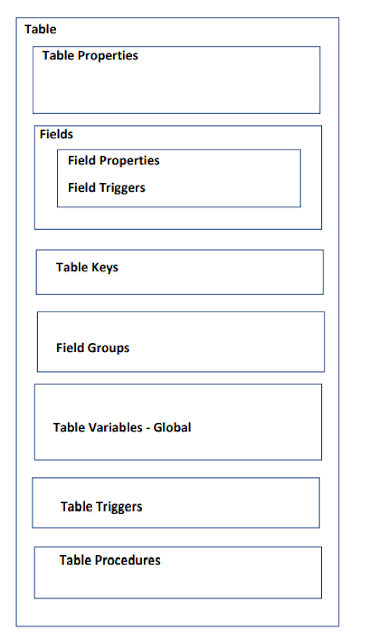
Multi-purpose Buttons Join on WhatsApp E-books for International Buyers E-books for Indian Buyers Schedule a Call The table in Business Central Introduction The table, which functions as both a data definition and a data container (a table's contents), is distinct from the data. The table specification (container) includes descriptions of data identification, data structure, validation processes, storage, and retrieval. Due to its innate architecture, changing this definition would require the assistance of a programmer. The information in the data is dynamic and derived from user behaviour. We see that the data is explicitly referred outside of the table as a definition of structure in the permissions setup data. Table Tables are the fundamental data storage units in Dynamics 365 Business Central.  The data will finally wind up in a table, regardless of whether a person inputs their informatio...

Learning Path: Business Central Technical Consultant | Dynamics 365 Business Central

Image
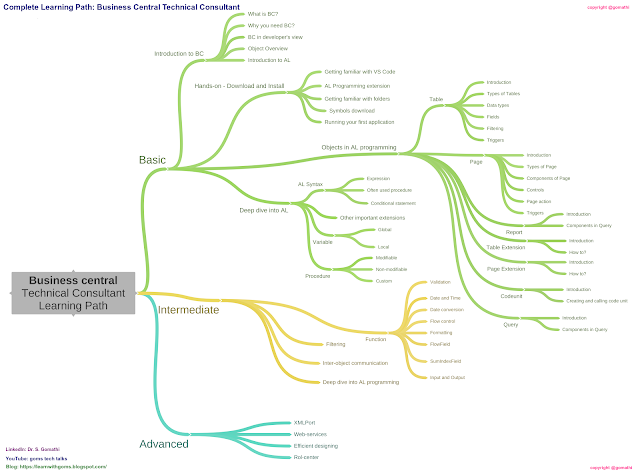
Multi-purpose Buttons Join on WhatsApp E-books for International Buyers E-books for Indian Buyers Schedule a Call Basic Concepts in Business Central The below image shows the mind map of Business Central Basic concepts to learn. Learn the below concepts.  Basic Introduction to BC Hand-on Download & install Objects in AL programming Table Table Extension Page Page Extension Codeunit Query Report Deep dive into AL programming Intermediate Functions Custom Functions Filtering Inter-object communication Deep dive into AL programming Report Extension Advanced XMLPort Web-services Efficient designing Role-center Report Customization Projects and Exercises Simple projects Projects with functions Exercises with XML-Port Exercises for forecasting